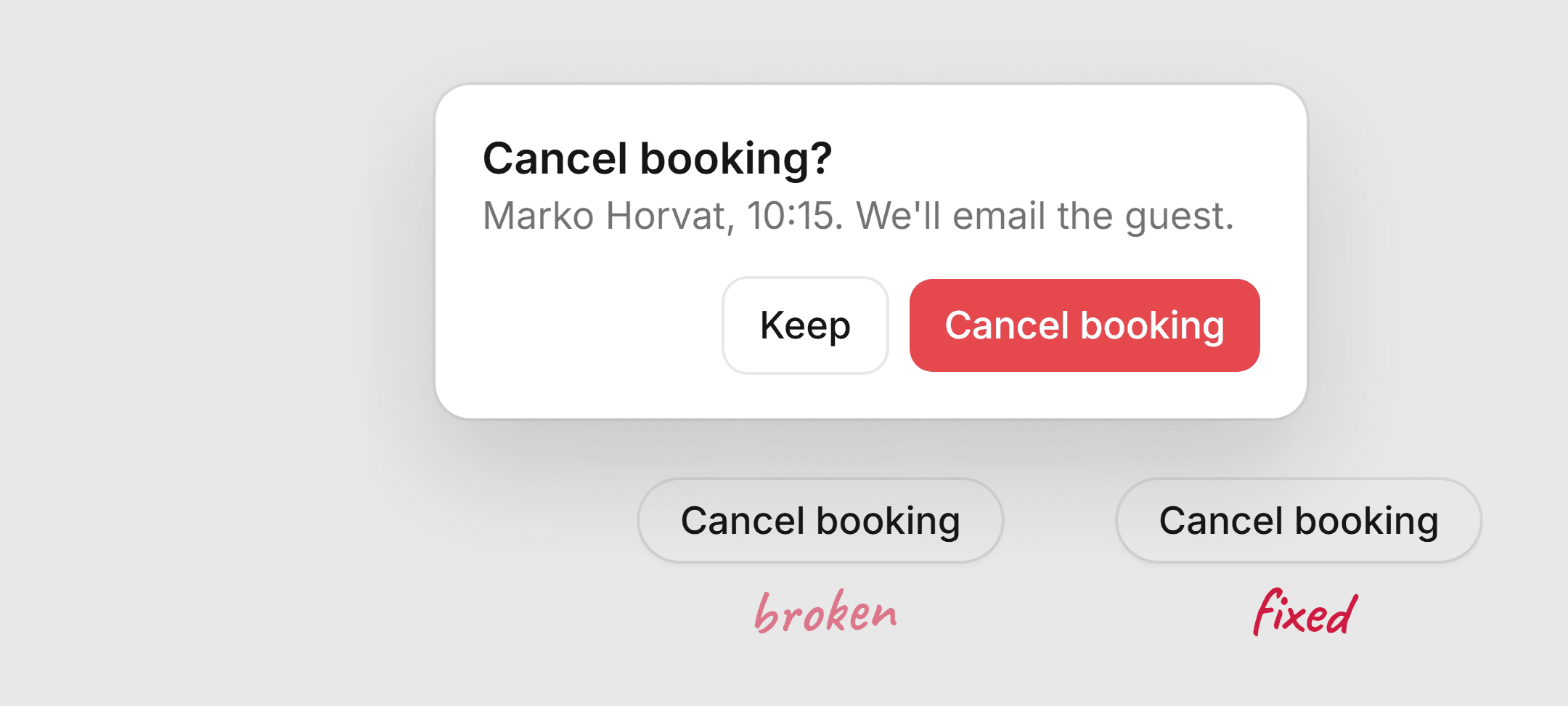
A dialog looks like the simplest component there is. A box over the page. But it's where the same few mistakes keep showing up, in component libraries, in design systems and in app code.
This is the first in a series where I take one component and go through what usually goes wrong with it. The code uses Base UI and Tailwind v4, but every point applies whatever you build on.
The animation that never plays
A common setup: the dialog scales up from 95% while it fades in. It looks right in the code, and it never plays.
Cancel booking?
Marko Horvat, 10:15. We'll email the guest.
Tailwind v4 compiles scale-95 to the standalone scale property, not to transform. The transition only lists transform, so the scale jumps to its end value and only the opacity animates. Nobody notices, because a plain fade still looks fine.
// Before: scale isn't in the list, so it jumps
"[transition:transform_250ms_cubic-bezier(0.32,0.72,0,1),opacity_200ms]",
"data-[starting-style]:scale-95 data-[starting-style]:opacity-0",

// After
"transition-[opacity,scale] duration-200 ease-(--ease-dialog)",
"data-[ending-style]:duration-150",
"data-[starting-style]:scale-[0.96] data-[starting-style]:opacity-0",
"data-[ending-style]:scale-[0.98] data-[ending-style]:opacity-0",
This line tends to get copied into every popover and menu in a codebase, so the bug spreads with it. Search for transition:transform next to scale, translate or rotate utilities. In v4 those are separate properties.
The backdrop and the panel disagree
Emil Kowalski shared a fix at Linear where the overlay and the dialog had different durations, and it felt off until he matched them. It's one of the most common motion bugs in overlays. A typical sheet fades the backdrop in over 300ms and slides the panel in over 500ms.
Booking #4821
The root cause is usually that there are no overlay motion tokens, so every overlay picks its own numbers. Two tokens fix it, duration.overlay and duration.overlayExit, read by both parts.
There's a second reason to keep them equal in Base UI. It only waits for the popup's own animations before unmounting, not the backdrop's. If the backdrop runs longer, its exit gets cut off. The popup is always the longest animation.
Exits as slow as entrances
Most dialogs take as long to leave as to arrive. But opening is someone waiting for something, and closing is someone done with it.
Try the confirm in the first demo again. It opens in 200ms and closes in 150ms, and it shrinks to 0.98 on the way out instead of all the way back to 0.96. A smaller, faster exit feels snappier without feeling abrupt.
Reduced motion that removes everything
Most overlays ignore prefers-reduced-motion, and a sheet sliding a full-width panel across the screen is exactly what that setting is for.
The usual fix goes too far the other way and removes the animation entirely, so the state change has no cue at all. Keep the fade, drop the movement.
Booking #4821
Long content on small screens
This is the one users actually hit. A dialog centered with -translate-y-1/2 and no max height works fine on a laptop. On a phone, a tall form gets clipped at both ends. Page scroll is locked, so Save is unreachable.
Edit booking
Edit booking
Cap the height at 100dvh minus 2rem and let the body scroll between a pinned header and footer. Use dvh, not vh, or the top hides under the iOS address bar. And give small dialogs a 16px gutter so they don't run edge to edge at 375px.
Confirms that don't wait for the server
A promise-based confirm() helper is a popular pattern, and it usually has two problems. If a second confirm opens while the first is still up, the first promise never resolves and its caller hangs. And clicking the action closes the dialog right away, so there's nowhere to show progress or an error.
Cancel booking?
Marko Horvat, 10:15. We'll email the guest.
Better: an onConfirm that returns a promise and keeps the dialog open while it runs. The spinner goes inside the button at a fixed width, Esc and Keep are blocked, and the error shows inline. Progress belongs where the action started.
Drawers
Base UI's drawer does the hard parts for you: velocity-based dismiss, rubber-banding, a backdrop that follows your finger. What it can't do for you is the two things drawers most often get wrong.
Move booking
Move booking
Extend the panel past the bottom edge with a --bleed variable, the way Base UI's own demos do, so dragging up never shows a strip of page. And always put a visible Close inside. A touch screen reader user can't swipe.
One more: a responsive panel that draws a grab handle on mobile but is a plain dialog underneath. Nothing drags. If it looks like a drawer, it should be one.
How the libraries compare
Here's how Base UI, Radix, React Aria and the native <dialog> element handle the same things.
| Base UI | Radix | React Aria | <dialog> | |
|---|---|---|---|---|
| Exit waits for | Popup only | Keyframes only | Overlay and modal | Chromium only |
| Interruptible | Yes | No, keyframes jump | Yes | Yes |
| Outside click | On | On | Off by default | closedby, no Safari yet |
| Nested styling | --nested-dialogs | None | None | :has() |
| Layering | Portal + z-index | Portal + z-index | Portal + z-index | Top layer |
React Aria is the only library that waits for both the backdrop and the panel, and the only one that makes outside content truly inert. Base UI is the only one that avoids popping the keyboard when a dialog opens from a tap, and it has the most careful scroll lock I've read. Radix only listens for animationend, so CSS transitions on close unmount instantly.
The checklist
- Backdrop and panel share a duration and curve, and the panel is the longest.
- Ease-out, and the exit is shorter than the entrance.
- Every animated property is actually in the transition list.
- Reduced motion fades instead of moving.
- Esc closes it, and there's a visible Close for touch screen readers.
- A destructive confirm doesn't focus the destructive button, and an outside click doesn't dismiss it.
- Long content scrolls inside, with the actions always visible, at 375px and in landscape.
dvhand safe areas, notvh.- Async actions show progress in the button that started them, and errors inline.
- Toasts and popovers opened inside it render above it.
Next up: tooltips, and whether we still need a positioning library now that CSS anchor positioning exists.