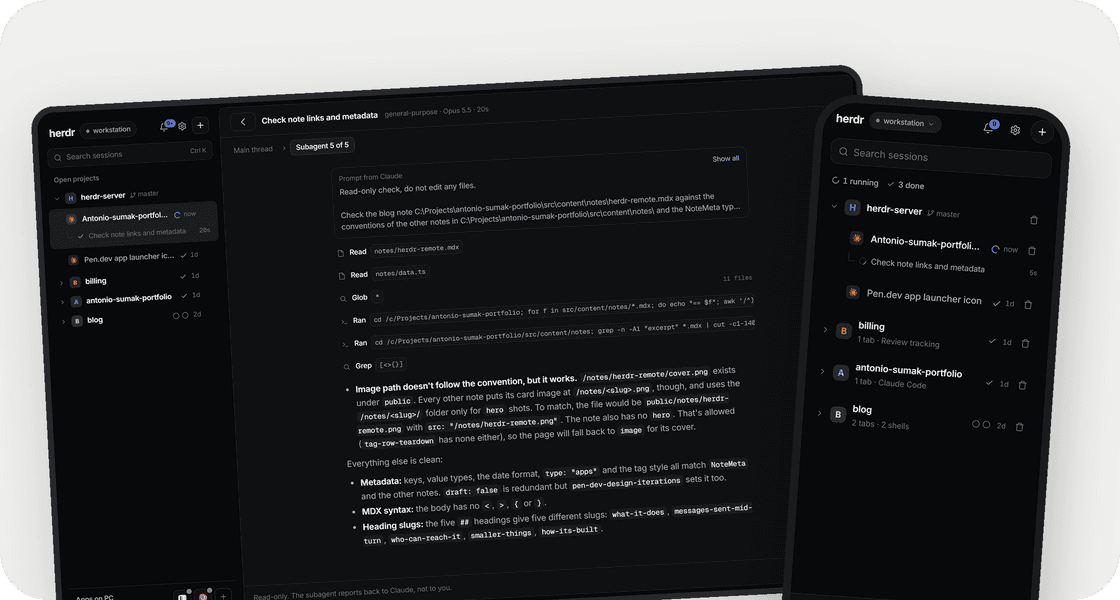
I run my agents in herdr, a terminal workspace that groups sessions into spaces and tabs and knows what each one is doing. A long task runs fine on its own until Claude Code wants to run one command and waits for a yes. If I'm making coffee, it waits for the whole coffee. If I'm out, it waits until I'm back. All I wanted was to reach the sessions already running on my PC from my phone.
What it does
node herdr-remote.js on starts a server in the background and prints a QR code. Scan it, add the page to the home screen, and the phone has:
- Inbox: every terminal, grouped by space with its git branch. Each one shows its status (working, waiting for you, done) and how long it's been in it. Running subagents sit under their session.
- Answers: buttons for permission prompts and questions. Claude Code's "1. Yes / 2. Yes, and don't ask again / 3. No" becomes Approve, Always, Deny, and multi-select questions get checkboxes.
- Chat: the server reads Claude Code's transcript and the app shows it as a conversation. Turns fold into "Worked 5m 15s · 44 tools", edits show as diffs, todo lists as checklists, images inline.
- Terminal: the real one when I need it, through xterm attached to the same session over a WebSocket.
- Notifications: a list, plus a bell and toasts while the app is open. They come when a session needs me, finishes or ends, and when a subagent finishes.
On the PC, a tray icon shows whether it's on, how many sessions are working or waiting, and the pairing QR.
Messages sent mid-turn
Claude Code queues messages typed during a turn, but changing that queue takes keystrokes that can stop the turn. So when I send something from the phone mid-turn, it waits on the server, where I can still edit, reorder or delete it. It goes in when the current step ends, which the server notices when a tool result lands in the transcript. If I do want to stop the turn, "send now" interrupts and sends right away.
Who can reach it
By default the server only listens on my Tailscale address, so my devices can reach it and nobody else's can. Phones won't install the app without HTTPS, so when the tailnet has HTTPS certificates the server goes through tailscale serve.
Two flags change the default:
--lanbinds to the local network instead.--publicopens a Cloudflare quick tunnel. Anyone could reach that, so it makes a fresh link every time.
The QR link is only for pairing. Each browser that opens it gets its own device token in a cookie. If I lose a phone, I unpair it in settings and the others stay signed in. I can also replace the link without touching the devices already paired.
Smaller things
- Keep the PC awake. Windows sleeps on its own schedule, and a phone can't approve anything on a sleeping PC. With this setting on, the server keeps the PC awake, but only while a session is working or waiting.
- Plan limits. A line under the composer shows the context used and the 5-hour and weekly limits, from the same endpoint Claude Code's
/usagereads. - PC apps. A short list in
apps.jsonlets me launch an app or bring it to the front. That's how I check a design in pen.dev before I tell the agent to go ahead. - Files. I can upload a screenshot from the phone, or pick a project file to add to the prompt.
How it's built
The server is one Node file with three dependencies: node-pty for the terminal, ws for the socket and qrcode-terminal for the QR. It talks to herdr only through its hc CLI, to list terminals, read the screen and send text. Prompts are parsed from the screen, and the chat comes from the transcript files.
The app started as one vanilla HTML page. At about a thousand lines I moved it to React, Vite and Tailwind. I designed each screen in pen.dev first, then built them from beautifui components: the thinking fold, tool chips, task rows, code blocks with a diff toggle, and the approval card.