Azure Boards tracks everything about a work item except the small steps inside it. The usual workaround is a bulleted list in the description, which nobody can tick off, or a child Task per step, which buries the board. Neither tells you at a glance whether a Bug has its repro steps or a Story has its acceptance criteria.
What it does
It adds a Checklist group to the work item form. Add items, edit them, drag to reorder, tick them off. Everyone on the team sees the same list, and the badge in the header shows how far along it is.
Tasks share their parent's checklist, so a Task under a Story shows the Story's list instead of starting an empty one.
A template per type
Under Project settings → Checklist templates each work item type gets its own default items. "Repro steps filled" for Bugs, "Acceptance criteria written" for Stories, whatever your definition of done is. Every new work item of that type starts with them.
- Copy from another type to start a template from one you already have.
- Turn auto-add off for a type when you want the template on hand but not on every new item.
- The process's own types show up, so custom types work too.
When the template changes
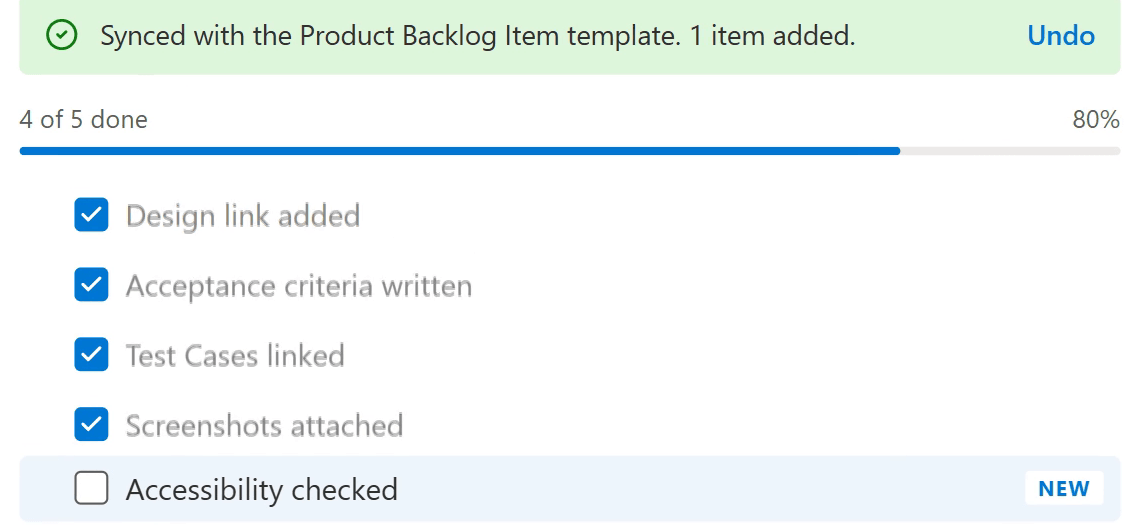
Changing a template doesn't rewrite existing work items. They get a small banner instead: the template has a new item, sync to add it.
Sync shows what it'll do before it does it: what's added, what's not in the template, what stays the same. New items go at the end with a NEW tag, and your own items and progress stay as they are. You can also remove items that aren't in the template, but only unchecked ones. Checked items are never removed, and Undo puts everything back.
Progress on the board
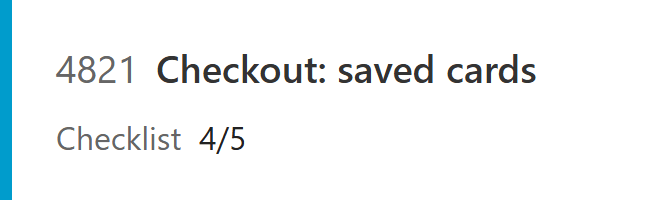
The checklist lives in the extension's own storage, so boards can't see it. If you want 3/5 on your cards, add a text field Custom.Checklist to your process and show it in the card settings. The extension keeps it up to date.
Writing that field was the fiddly part. When you've got unsaved edits on the form, a REST update would make your next save conflict. So in that case it sets the field on the form and lets your save carry it, and only writes through the API when the form is clean:
// Unsaved edits on this form: let the user's save carry the value, a REST write would make that save conflict.
if (own && await form.isDirty()) return void form.setFieldValue(COUNT_FIELD, value);Get it
It's free on the Visual Studio Marketplace. Install it in your organization, add a template or two, and open any saved work item. It works on Azure DevOps Services, not on-prem Server.
The source is on GitHub. If it does something odd on your process, open an issue with the work item type and what you expected.